Checkout review
Keep the sale on your processor: ThriveCart pricing, the affiliate center, and what you still handle
ThriveCart is the checkout to use when the sale should hit your Stripe or PayPal account with no platform cut, and you will move to Pro+ if partners promote the offer.
You have seen the one-time price and a checkout with no platform fee, and you want to know if a partner can promote the offer. They can, once the account is on Pro+. The buyer's payment still lands in your Stripe or PayPal account, and you send the ThriveCart affiliate commission yourself.
The monthly bills and the one-time Standard license are in the plan table further down. Set them next to each other before you pay a year up front.
Compare the monthly bill with the one-time license
You still handle refunds, tax, and affiliate payouts
The affiliate setup article says you are the merchant of record. Customer funds go to the processor you connect, and ThriveCart does not hold them. The buyer's card statement shows the name on the processor account you connected. Refunds and chargebacks are handled in that same processor account.
List the same product on ClickBank or Digistore24, and the network's name is what the buyer sees on the card. That company also splits the sale with the affiliate. JVZoo can deposit a sale to your processor and still charges its own platform fee for the listing. On a ThriveCart sale, the fee for moving the money is the one your processor charges. CopeCart is the EU reseller option: the buyer pays CopeCart, and CopeCart is the company on that order.
When the company that charges the card must remit the tax and pay the affiliates, a network listing does that work. ThriveCart runs the order form, the bump, and the upsell on the processor you already use.
What you get before anyone becomes a ThriveCart affiliate
The homepage lists one bump offer, one-click upsells and downsells, sales tax automation, and unlimited products and funnels on Standard. Pro+ adds the affiliate center, more than one bump, custom domains, subscription dunning, and JV contracts.
The bump and the one-click upsell are included in the plan you can use without partners. The affiliate center is what you add when a partner's link must get credit for a sale. That person joins your program, and the account has to be on Pro+ or a legacy plan that includes affiliates.
What works
- ThriveCart adds no platform percentage per sale. You pay the processing fee that Stripe or PayPal already charges.
- Standard includes one bump, one-click upsells and downsells, sales tax automation, and unlimited products and funnels.
- New subscriptions include a 30-day trial. The one-time Standard license is sold on a separate checkout page.
- Tax calculation and collection are available, with a lower rate on Pro+ than on Standard.
- The homepage lists extra bumps, custom domains, subscription dunning, and JV contracts on Pro+, along with the affiliate center.
What to watch
- A new account does not get the affiliate center on Standard. Legacy Pro and Client accounts are the exception named in the setup article.
- Commissions go out through your PayPal account. Stripe and Authorize.net cannot send affiliate commissions from inside ThriveCart.
- You are the merchant of record, and the customer's money goes to your processor.
- Buyers report slow refunds for ThriveCart subscriptions.
- Sellers describe checkout downtime that blocked payment, and a Capterra review describes a refund that posted twice.
What a vendor gives up
Affiliate tracking on a new account is a Pro+ feature, commissions are paid through your PayPal account, and you remain the merchant on the charge. One public comment describes a slow refund of the software subscription. Another describes checkout downtime that blocked a payment.
What buyers keep saying
Research: unverifiedRefund delays on the software bill: a ↓ common complaint
A buyer on r/digital_marketing said a refund requested during the return window had still not been paid, and described the refund process as poor even though the software itself was fine.
“the bottom line is that maybe their software works great, but their refund policy and customer service around refunds just sucks, even having requested it during the refund period.”
Sellers who try other tools and return: ↑ frequently praised
Another person in that thread said they have tried a variety of platforms and keep returning to ThriveCart.
“Have tested a variety of platforms and always come back to ThriveCart”
Outages and who stayed
One seller said the platform went down and customers could not pay. Another in the same thread said they stayed because they believe ThriveCart is a verified Stripe partner and SamCart is not.
“systems go down all the time and I've had a few times now where my customers couldn't even pay”
“I think thrivecart is also a verified Stripe partner, where samcart isn't”
A customer refund processed twice: a ↓ common complaint
A Capterra reviewer said a refund was processed twice, which created an accounting problem and a difficult conversation with the customer.
“There has been a few different times we've tried to issue a needed refund, and it refunded the person twice, causing complications in revenue and inconvenient conversations with users.”
The page builder and the coupon field: a ↓ common complaint
A Capterra reviewer said they do not love the sales page builder, and that clients have trouble finding the coupon field.
“I don't love the salespage builder, the coupon code field for some reason is always hard for clients to find.”
Affiliate tools behind a yearly fee: a ↓ common complaint
A buyer wrote that affiliate management on the lifetime plan was locked behind a $295 a year paywall.
“when she tried to set up affiliate management, it turned out that it was actually locked behind the $295/year paywall.”
Unanswered email after a lifetime purchase: a ↓ common complaint
A buyer wrote that they paid $800 for a lifetime membership plus Learn, and that several emails brought no answer.
“Paid $800 for a lifetime membership (plus additional for Learn, etc).”
“no one has returned my emails with an answer.”
Support speed compared with SamCart: a ↓ common complaint
In an alternatives thread, a reader called SamCart the closest direct competitor and described its support as much more responsive.
“SamCart the closest direct competitor with Support much more responsive.”
Monthly cost versus the license
In a Kartra versus ThriveCart thread, a buyer said the monthly bills add up.
“the monthly cost adds up”
What the public comments describe
Readers are talking about two different purchases. One is the software subscription you buy from ThriveCart. The other is the checkout your customer uses.
On r/digital_marketing, a buyer said a refund for the software purchase, requested within the refund window, took weeks to arrive. They treated whether the checkout works as a separate issue from the refund.
A martech thread about choosing a cart includes a seller who said outages left buyers unable to finish paying. The same thread includes a seller who had Stripe problems with SamCart, and who said staying with ThriveCart had been the right call. Read the two comments together. One is about whether the order form stays up. The other is about which company a seller trusted after a processor dispute.
ThriveCart pricing: monthly, annual, and the one-time license
New plans include a 30-day trial. Standard subscriptions include a ThriveCart Academy Starter plan. The pricing post lists that plan next to the Standard rates, and it is also the source for the annual Pro+ rate. The month-to-month figures appear on the live checkouts: Standard and Pro+. The one-time Standard option is on the lifetime checkout. The yearly upgrade for people who already hold that license is in the Pro+ article.
| Plan | Price | How it bills |
|---|---|---|
| Standard | $47 | Each month, after the trial |
| Standard, annual | $37 | Per month, billed for the year |
| Standard, lifetime | $495 | Once |
| Pro+ | $87 | Each month, after the trial |
| Pro+, annual | $67 | Per month, billed for the year |
| Pro+ on lifetime | $295 | Per year, on top of the one-time Standard license |
Ten months at the month-to-month Standard rate come to $470, which is still less than the one-time license. The eleventh payment brings that total to $517, which is more than the one-time license. This comparison uses only the higher month-to-month rate. The annual price is a separate row in the table.
Use the monthly trial if you still need to see how the bump behaves on a live checkout. Buy the one-time license if you already expect to keep the checkout for more than eleven months. Add Pro+ in the month you enroll the first partner. Standard already carries the bump and the upsell, so the upgrade is the affiliate center, the extra bumps, custom domains, dunning, and JV contracts.
The ThriveCart fees page places this software bill next to what the networks take out of a sale.
The ThriveCart affiliate center requires Pro+
Affiliate promotions start on Pro+. A new account gets them by upgrading to Pro+. A legacy Pro or Client account already includes them. ThriveCart affiliate setup, for a new account, starts with that upgrade.
You pay your partners yourself. You receive the customer's payment, minus processor fees, and the commission goes from your account to the affiliate.
The ThriveCart affiliate link partners have to share
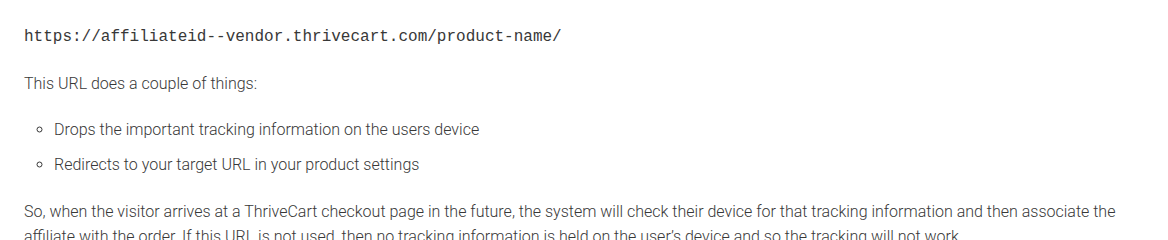
Affiliate links use this host pattern: https://affiliateid--vendor.thrivecart.com/product-name/. The host is the affiliate id, two hyphens, and your account name. The product slug is the path. ThriveCart affiliate tracking follows that address.
The address a browser shows after the redirect, the one carrying an affiliate query parameter, does not record the sale. A partner who copies that redirected URL sends traffic that will not be credited. Give partners the dashboard link, the one with the double hyphen in the host, and treat any other format as a missed commission.
ThriveCart affiliate commission and the PayPal payout
ThriveCart affiliate payouts go through PayPal. Once PayPal is connected, it can send each commission on its own or wait until you release it. Stripe and Authorize.net can take the customer's payment. They cannot send the affiliate commission from inside the tool. Paying the partner outside ThriveCart, and keeping your own record, is allowed.
You fund that commission from revenue that has already reached your processor. The customer pays you, and you pay the affiliate.
Tax automation adds its own percentage
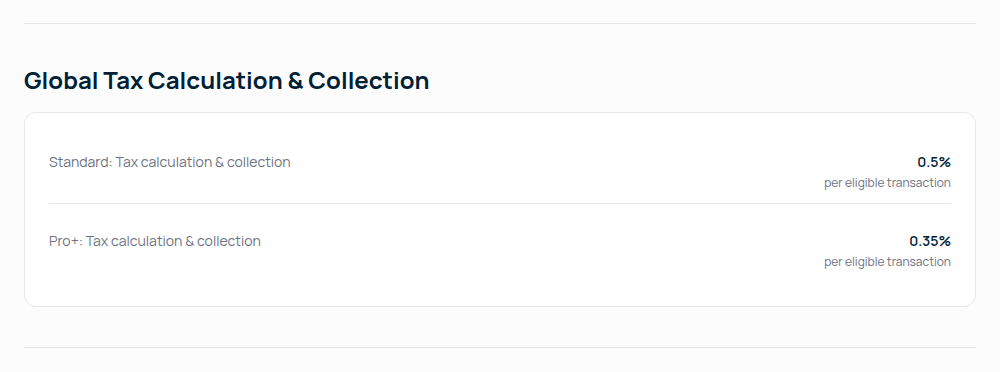
The processor fees page states a 0% fee for ThriveCart. You still pay the processor. On that same page, the tax automation line is 0.5% per eligible transaction on Standard and 0.35% on Pro+. That line is the fee for the calculation. It sits on top of the zero platform cut.
Each network takes a percentage of the sale. Several of them also hold funds for a period before you can withdraw. Put a sample order through the affiliate network fee calculator, then read the payout timeline for the reserve. Those hold periods belong to the networks. On a ThriveCart charge, your processor pays you.
The SamCart comparison sets the two hosted checkouts side by side. The SamCart review covers the other cart, for vendors who want bumps and a private affiliate program. The review index lists every network and cart covered here. Use the fees page above when you want this software bill in the same list as those network cuts.
Where to go from here
- ThriveCart fees and pricing for vendors
- ThriveCart alternatives, and who should switch
- SamCart vs ThriveCart for vendors
- PayKickstart or ThriveCart for affiliates you pay yourself
- How ThriveCart ranks among affiliate networks for vendors
- ClickBank review
- Digistore24 review
- BuyGoods review
- JVZoo review
- CopeCart review
- WarriorPlus review
- CartPanda review
- MaxWeb review
- SamCart review
- Hotmart review
- PayKickstart review
- ClickFunnels review
- Stan Store review
Changelog
- 2026-10-16: First published. Fees and terms come from the company's own seller pages.
- 2026-10-21: reviewed and updated.
Frequently asked questions
Is the lifetime license still for sale?
Do I need Pro+ to run a ThriveCart affiliate program?
Who is the merchant of record on a ThriveCart sale?
How does a ThriveCart affiliate payout work?
How does ThriveCart compare with SamCart?
Can I use ThriveCart and still list on JVZoo or ClickBank?
What we read
From ThriveCart
- https://thrivecart.com/
- https://thrivecart.com/company/processorfees/
- https://support.thrivecart.com/help/the-complete-affiliate-setup-walkthrough/
Other sources
We read 11 discussions and reviews. Quotes are excerpts; open a link to read the original in context.
- [r1] Thoughts on ThriveCart
- [r2] Thoughts on ThriveCart
- [r3] Thrivecart vs Samcart decisions
- [r4] Thrivecart vs Samcart decisions
- [r5] ThriveCart reviews on Capterra
- [r6] ThriveCart reviews on Capterra, page 2
- [r7] Thoughts on ThriveCart
- [r8] Do any of you really use thrivecart?
- [r9] Do any of you really use thrivecart?
- [r10] ThriveCart alternatives
- [r11] Kartra vs ThriveCart
Written by
Vendor Runbook Editorial Desk
Editorial desk
The editorial desk at Vendor Runbook. It sets the testing standard the reviews are held to, signs the pages no single writer owns, and publishes the notes and dates behind every ranking. Corrections go to the contact page and are logged on the page they change.
Last checked 2026-10-21
Comments
No comments yet. Questions and your own experience are welcome.
Thank you. Your comment will appear once it has been reviewed.